Data Applications → Incorta Data Delivery of Oracle EBS for Data Destinations
About Incorta Data Delivery of Oracle EBS
Incorta Data Delivery streamlines the integration between Oracle E-Business Suite (EBS) and Data Destinations. Incorta Data Delivery accelerates data mart deployment, and automates data model design and source schema mapping with the Incorta Oracle EBS data application. The Incorta Oracle EBS data application provides a new, faster, more effective option for analyzing and understanding your data, with no data modeling or extract, transform, load (ETL) required.
Following is the high-level Incorta Data Delivery process:
- Connect Incorta to your data source with a data application, and load pre-existing physical schema fact and dimension tables.
- The physical schema tables are materialized into parquet.
- Load the Data Destination using the previously materialized parquet.
App Overview
Following are the Oracle EBS modules and business flows for which Incorta Data Delivery is available:
Financial Modules
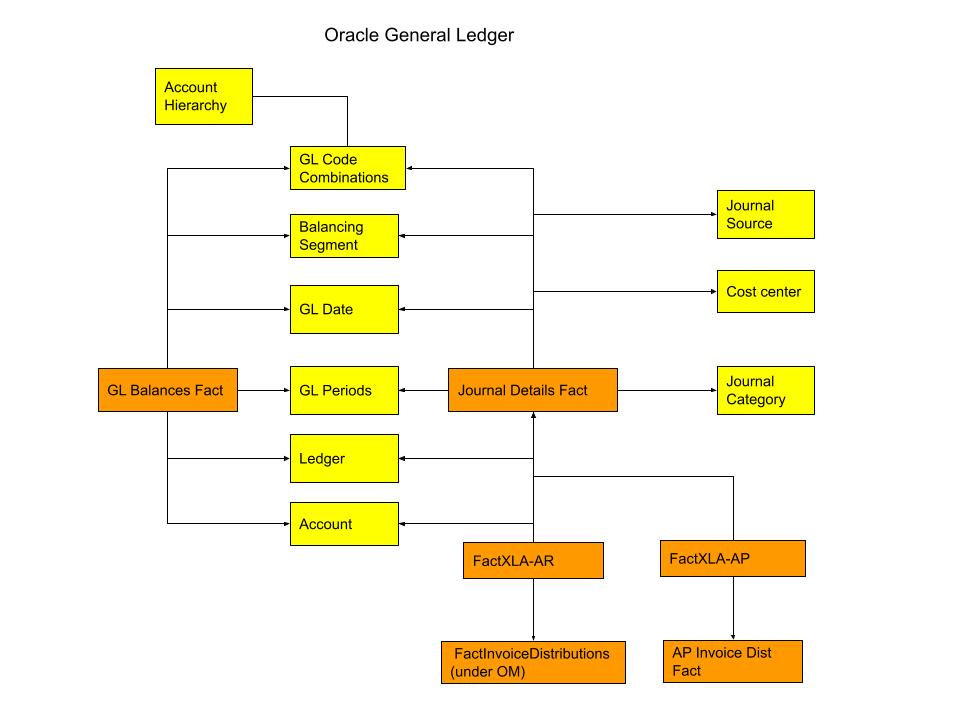
- General Ledger: Helps you analyze core financial statements and the underlying transactions
Supply Chain Planning Modules
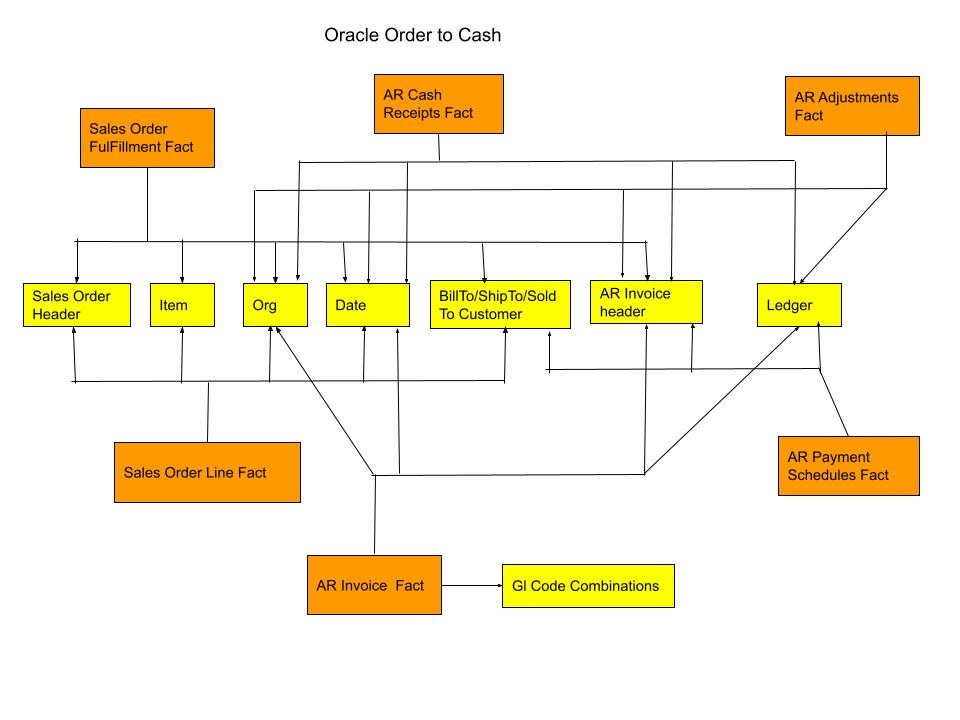
- Order Management: Helps you automatically identify risks to open orders and seamlessly unite data from various business functions, so you can optimize order fulfillment and maximize customer satisfaction
Business Flows
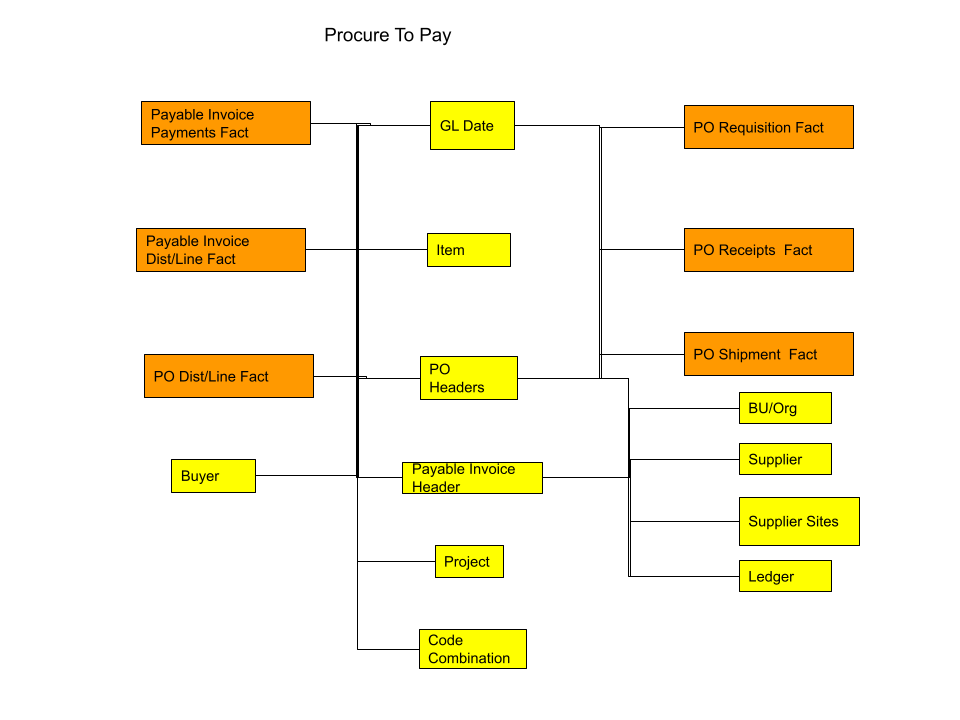
- Procure to Pay: Helps you analyze the end-to-end buying process, from initial request and purchase through to invoicing and payment for goods and services received
Configure Incorta Data Delivery
To configure Incorta Data Delivery, the following steps are required:
- Configure the Oracle EBS data application
- Create a Data Destination
- Set a Data Destination for a Physical Schema
- Create Materialized Views to Trigger Data Ingest
Install and Configure the Oracle EBS Data Application
Incorta Data Delivery is pre-configured with sample Oracle EBS data, which will allow you to preview the Oracle EBS integration with your Data Destionation before you connect to and configure the data application for your Oracle EBS instance. If you would like to use your own Oracle EBS data, follow the steps in the Configure the Oracle EBS data application section of Data applications → Install and Configure Oracle EBS for Incorta Cloud.
External Data Sources
Here are the predefined External Data Sources:
| External Data Source | Type | Description |
|---|---|---|
| EBS | oracle | This external data source connects to your Oracle EBS database. Refer to Configure the Oracle EBS data application for details on how to update the properties for your instance. |
| Incorta | mysql | This external data source is for the Incorta metadata. |
| Postgres | postgres | This external data source is for Incorta over Incorta. |
| SparkSql | postgres | This external data source is for materialized views. |
Do not delete the External Data Sources, as they are required.
Data Files
Here are the pre-defined Local Data Files used in the COMMON physical schemas:
Date_US.csvMonth_US.csvPeriod.csvQuarter.csv
Do not delete the Local Data Files, as they are required.
Global Variables
Here are the pre-defined global variables:
| Global Variable | Description |
|---|---|
| flex_value_set_id | This global variable is used in the Account_Hierarchy and CostCenter_Hierarchy tables in the EBS_FIN_COMMON physical schema. Refer to Configure the Oracle EBS data application for details on how to update the value of this global variable for your Oracle EBS instance. |
| Default_InitialExtractDate | Optionally use this global variable to limit rows for large transaction tables during a full load. For example: last_update_date > $$Default_InitialExtractDateRefer to Configure the Oracle EBS data application for more details. |
Security Groups
Here are the pre-defined security groups:
| Security Group | Description |
|---|---|
| Super User | This is the Administrator. You can change this password using the Profile Manager. |
EBS Common Physical Schemas
| Physical Schema | Description |
|---|---|
| EBS_CAL_COMMON | This physical schema contains the Oracle EBS calendar tables |
| EBS_COMMON_DIM_ALL | This physical schema contains the materialized views copied to parquet that represent Oracle EBS dimensions used across modules and business flows, such as calendars, accounts, cost centers, operating units, and more |
| EBS_FIN_COMMON | This physical schema contains the Oracle EBS finance tables |
| EBS_FND_COMMON | This physical schema contains the Oracle EBS foundation, or application object library, tables |
| EBS_HR_COMMON | This physical schema contains the Oracle EBS human resources tables |
| EBS_ITEM_COMMON | This physical schema contains the Oracle EBS Item Master tables |
| EBS_PARTY_COMMON | This physical schema contains the Oracle EBS party, or business entity, tables |
The EBS_XLA and EBS_XLA_MV physical schemas are included with Incorta Data Delivery, but are not used.
EBS_COMMON_DIM_ALL Materialized Views
Here are the EBS_COMMON_DIM_ALL materialized views copied to the Data Destination:
| Materialized View | Description | Primary/Foreign Keys |
|---|---|---|
| DimAccountHierarchy | This materialized view contains the dimensions for the account hierarchy, or parent/child relationships | Account |
| DimAccounts | This materialized view contains the dimensions for the accounts | CODE_COMBINATION_ID |
| DimBalancingSegment | This materialized view contains the dimensions for the balancing segment, or segment used to ensure that all journals balance for each balancing segment value | CODE_COMBINATION_ID |
| DimCodeCombinations | This materialized view contains the dimensions for the code combinations, or the segment pairings for each accounting key flexfield (KFF) | CODE_COMBINATION_ID |
| DimCostCenter | This materialized view contains dimensions for the cost centers | CODE_COMBINATION_ID |
| DimCustomer | This materialized view contains the customer dimensions | SITE_USE_ID |
| DimFiscalCalendar | This materialized view contains the fiscal calendar dimensions | GL_Date |
| DimGLPeriods | This materialized view contains the general ledger period dimensions | PERIOD_SET_NAME PERIOD_NAME |
| DimGregorianCalendar | This materialized view contains the Gregorian calendar dimensions | Date |
| DimItem | This materialized view contains the inventory item dimensions | INVENTORY_ITEM_ID ORGANIZATION_ID |
| DimLedgers | This materialized view contains the customer dimensions | LEDGER_ID |
| DimOperatingUnit | This materialized view contains the operating unit dimensions | ORGANIZATION_ID |
| DimPerson | This materialized view contains the details for the person entity | PERSON_ID |
| DimSuppliers | This materialized view contains the supplier dimensions | VENDOR_ID |
| DimSupplierSite | This materialized view contains the supplier site dimensions | VENDOR_SITE_ID |
CommonDimensionDM Business Schema
The CommonDimensionDM Business Schema is used to create the EBS_COMMON_DIM_ALL materialized views.
Order Management Physical Schemas
| Physical Schema | Description |
|---|---|
| EBS_AR | This physical schema contains the Oracle EBS accounts receivable tables |
| EBS_AR_FACTS_ALL | This physical schema contains the accounts receivable fact tables copied to parquet |
| EBS_AR_MV | This physical schema contains the GL codes and invoice tax materialized views |
| EBS_AR_SNP | This physical schema contains the AR aging and write-off materialized views |
| EBS_OM_FACTS_ALL | This physical schema contains the order management fact tables copied to parquet |
| EBS_ONT | This physical schema contains the Oracle EBS order management tables |
EBS_AR_FACTS_ALL Materialized Views
Here are the EBS_AR_FACTS_ALL materialized views copied to the Data Destination:
| Materialized View | Description | Primary/Foreign Keys |
|---|---|---|
| FactARPaymentSchedules | This materialized view contains the AR payment schedules | PAYMENT_SCHEDULE_ID |
| FactCashReceipts | This materialized view contains the cash receipts | CASH_RECEIPT_HISTORY_ID |
ARCashReceiptsDM Business Schema
The ARCashReceiptsDM Business Schema is used to create the EBS_AR_FACTS_ALL materialized views.
EBS_OM_FACTS_ALL Materialized Views
Here are the EBS_OM_FACTS_ALL materialized views copied to the Data Destination:
| Materialized View | Description | Primary/Foreign Keys |
|---|---|---|
| FactInvoiceDetails | This materialized view contains the invoice detail facts | CUSTOMER_TRX_LINE_ID |
| FactSalesOrderHeader | This materialized view contains the sales order header facts | HEADER_ID |
| FactSalesOrderLine | This materialized view contains the sales order line facts | CUSTOMER_TRX_LINE_ID LINE_ID |
OrderManagementDM Business Schema
The OrderManagementDM Business Schema is used to create the EBS_OM_FACTS_ALL materialized views.
General Ledger Physical Schema
| Physical Schema | Description |
|---|---|
| EBS_GL | This physical schema contains the Oracle EBS general ledger tables |
| EBS_GL_FACTS_ALL | This physical schema contains the general ledger fact and dimension tables copied to parquet |
EBS_GL_FACTS_ALL Materialized Views
Here are the EBS_GL_FACTS_ALL materialized views copied to the Data Destination:
| Materialized View | Description | Primary/Foreign Keys |
|---|---|---|
| DimJournalCategory | This materialized view contains the journal category dimensions | JE_CATEGORY_NAME |
| DimJournalSource | This materialized view contains the journal source dimensions | JE_SOURCE_NAME |
| FactGLBalances | This materialized view contains the general ledger balance facts | CODE_COMBINATION_ID LEDGER_ID CURRENCY_CODE PERIOD_NAME |
| FactJournalDetails | This materialized view contains the journal detail facts | JE_HEADER_ID JE_LINE_NUM |
GeneralLedgerDM Business Schema
The GeneralLedgerDM Business Schema is used to create the EBS_GL_FACTS_ALL materialized views.
Procure to Pay Physical Schemas
| Physical Schema | Description |
|---|---|
| EBS_AP | This physical schema contains the Oracle EBS accounts payable tables |
| EBS_AP_FACTS_ALL | This physical schema contains the accounts payable fact and dimension tables copied to parquet |
| EBS_INV | This physical schema contains the Oracle EBS inventory tables |
| EBS_PA | This physical schema contains the Oracle EBS projects tables |
| EBS_PO | This physical schema contains the Oracle EBS purchase order tables |
| EBS_PO_FACTS_ALL | This physical schema contains the purchase order fact and dimension tables copied to parquet |
EBS_AP_FACTS_ALL Materialized Views
Here are the EBS_AP_FACTS_ALL materialized views copied to Data Destinations:
| Materialized View | Description | Primary/Foreign Keys |
|---|---|---|
| DimProject | This materialized view contains the project dimensions | PROJECT_ID |
| DimInvoiceHeaders | This materialized view contains the invoice header | INVOICE_ID |
| FactInvoiceDistributions | This materialized view contains the invoice distribution facts | INVOICE_DISTRIBUTION_ID |
| FactInvoiceHolds | This materialized view contains the invoice hold facts | HOLD_ID |
| FactInvoicePayments | This materialized view contains the invoice payment facts | INVOICE_PAYMENT_ID |
PayablesDM Business Schema
The PayablesDM Business Schema is used to create the EBS_AP_FACTS_ALL materialized views.
EBS_PO_FACTS_ALL Materialized Views
Here are the EBS_PO_FACTS_ALL materialized views copied to Data Destinaitons:
| Materialized View | Description | Primary/Foreign Keys |
|---|---|---|
| DimBuyer | This materialized view contains the buyer dimensions | AGENT_ID |
| DimPurchaseOrderHeader | This materialized view contains the purchase order header dimensions | PO_HEADER_ID |
| FactPurchaseOrderDistribution | This materialized view contains the purchase order distribution facts | PO_DISTRIBUTION_ID |
| FactPurchaseOrderReceipts | This materialized view contains the purchase order receipt facts | PO_HEADER_ID INVOICE_ID PO_DISTRIBUTION_ID ORG_ID VENDOR_ID TRANSACTION_ID |
| FactPurchaseOrderRequisition | This materialized view contains the purchase order requisition facts | DISTRIBUTION_ID |
| FactPurchaseOrderShipment | This materialized view contains the purchase order shipment facts | LINE_LOCATION_ID |
PurchaseOrderDM Business Schema
The PurchaseOrderDM Business Schema is used to create the EBS_PO_FACTS_ALL materialized views.
Create a Data Destination
To create a data destionation, please refer to this page for the most up-to-date list of destinations and their configuration instructions.
For more information on how to manage Data Destinations, refer to Tools → Data Manager.
Set a Data Destination for a Physical Schema
Set a Data Destination for physical schemas. This will not only load data into Incorta, but also send them to the assigned destionation. Here are the steps:
- In the Navigation bar, select Schema.
- In the Action bar, select Settings (gear icon) → Set Data Destination.
- In the Set Schema Destination for <SCHEMA_NAME> dialog,
- Select a Schema Destination or select + New Schema Data Destination to create a new one.
- Select Done.
Set the data destination for the physical schemas you need to send to the Data Destination, which include:
- EBS_AP_FACTS_ALL
- EBS_AR_FACTS_ALL
- EBS_COMMON_DIM_ALL
- EBS_GL_FACTS_ALL
- EBS_OM_FACTS_ALL
- EBS_PO_FACTS_ALL
You will need to create a data destination for any additional physical schemas you would like to ingest into your desired Data Destination.
Additional documentation of examples and customization of this EBS app can be found here.