Data Applications → Incorta Data Delivery of Oracle Cloud ERP
About Incorta Data Delivery of Oracle Cloud ERP for Data Destinations
Incorta Data Delivery streamlines the integration between Oracle Cloud ERP and Data Destinations. Incorta Data Delivery accelerates data mart deployment and automates data model design and source schema mapping with the Incorta Oracle Cloud ERP data application. The Incorta Cloud ERP data application provides a new, faster, more effective option for analyzing and understanding your data, with no data modeling or extract, transform, load (ETL) required.
Following is the high-level Incorta Data Delivery process:
- Connect Incorta to your data source with a data application, and load pre-existing physical schema fact and dimension tables.
- The physical schema tables are materialized into parquet.
- Load the Data Destination using the previously materialized parquet.
Install and configure Oracle Cloud ERP for Incorta On-Premises
Follow the steps on the Data applications → Install and Configure Oracle Cloud ERP doc to install and configure Oracle Cloud ERP.
Install and configure Oracle Cloud ERP for Incorta Cloud
- Sign in to Incorta Analytics.
- Select Marketplace in the navigation bar.
- Select Applications from the submenu bar.
- Search for and select Oracle Cloud ERP data app (BICC).
- Select Install.
Set a Data Destination for the Fact and Dimension physical schemas
Configure and set a Data Destination for each Fact and Dimension table listed for the applicable module(s).
| Business Process | Module | Fact and Dimension Physical Schemas |
|---|---|---|
| Procure To Pay | Account Payables (AP) Procurement (PO) | FUSION_COMMON_DIM_ALL FUSION_AP_FACTS_ALL FUSION_PO_FACTS_ALL |
| Order to Cash | Account Receivables (AR) Order Management (OM) | FUSION_COMMON_DIM_ALL FUSION_AR_FACTS_ALL FUSION_OM_FACTS_ALL |
| General Ledger | General Ledger (GL) | FUSION_COMMON_DIM_ALL FUSION_GL_FACTS_ALL |
| Projects (PPM) | Projects (PPM) | FUSION_COMMON_DIM_ALL FUSION_PRJ_FACTS_ALL |
| HCM Core | HCM Core | FUSION_COMMON_DIM_ALL FUSION_HCM_FACTS_ALL |
| GL Budgetary Control | Budgetary Control | FUSION_COMMON_DIM_ALL FUSION_BUDGET_CONTROL_FACTS_ALL |
| Fixed Assets | Fixed Assets | FUSION_COMMON_DIM_ALL FUSION_FA_FACTS_ALL |
Load the physical schemas
Prerequisite
Before loading the Oracle Cloud ERP Fact and Dimension schemas, load the Oracle Cloud ERP base schemas as outlined in Data applications → Install and Configure Oracle Cloud ERP → Perform a Full Load of the Physical Schemas.
Here are the steps to perform a full load for each physical schema:
- In the Navigation bar, select Schema.
- In the Schema Manager, select the Schemas tab.
- In the list view of physical schemas, select the base schema to open it.
- In the Schema Designer, in the Action bar, select Load → Full Load.
Load the Base physical schemas
| Business Process | Module |
|---|---|
| Procure To Pay | Account Payables (AP) Procurement (PO) |
| Order to Cash | Account Receivables (AR) Order Management (OM) |
| General Ledger | General Ledger (GL) |
| Projects (PPM) | Projects (PPM) |
| HCM Core | HCM Core |
| GL Budgetary Control | Budgetary Control |
| Fixed Assets | Fixed Assets |
Load the Fact and Dimension physical schemas
Perform a load of the Fact and Dimension physical schemas for each Oracle Cloud ERP module:
| Business Process | Module |
|---|---|
| Procure To Pay | Account Payables (AP) Procurement (PO) |
| Order to Cash | Account Receivables (AR) Order Management (OM) |
| General Ledger | General Ledger (GL) |
| Projects (PPM) | Projects (PPM) |
| HCM Core | HCM Core |
| GL Budgetary Control | Budgetary Control |
| Fixed Assets | Fixed Assets |
Additional Information
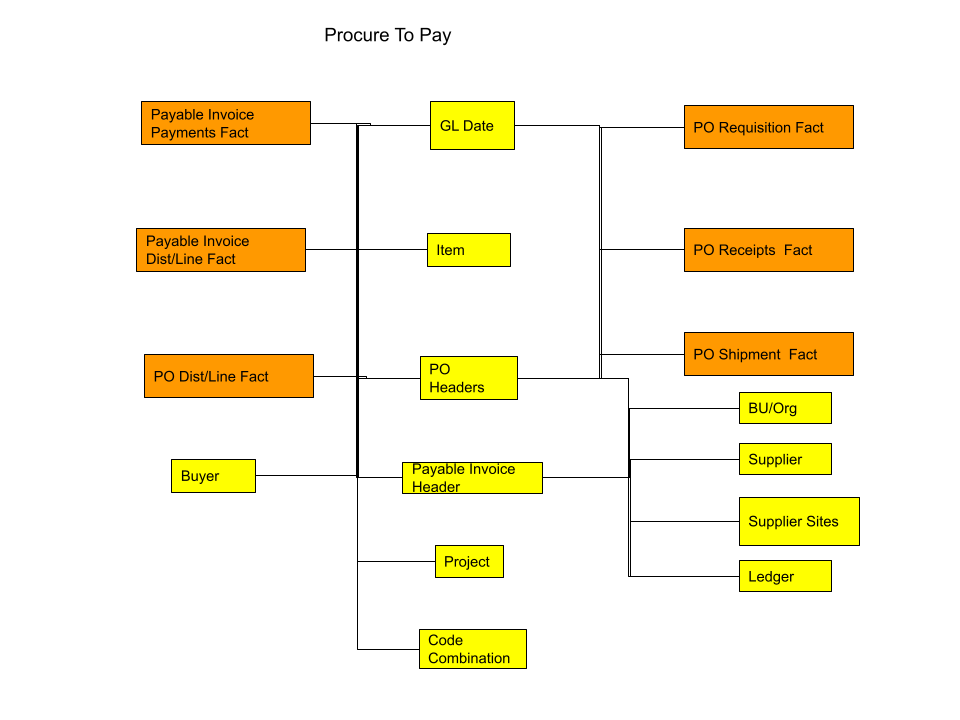
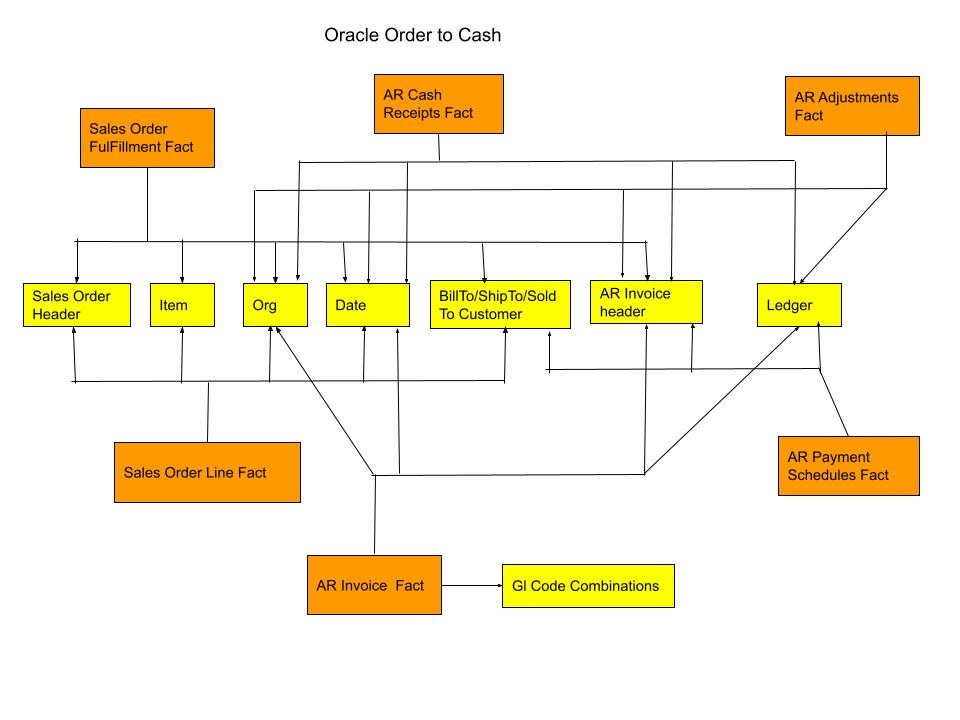
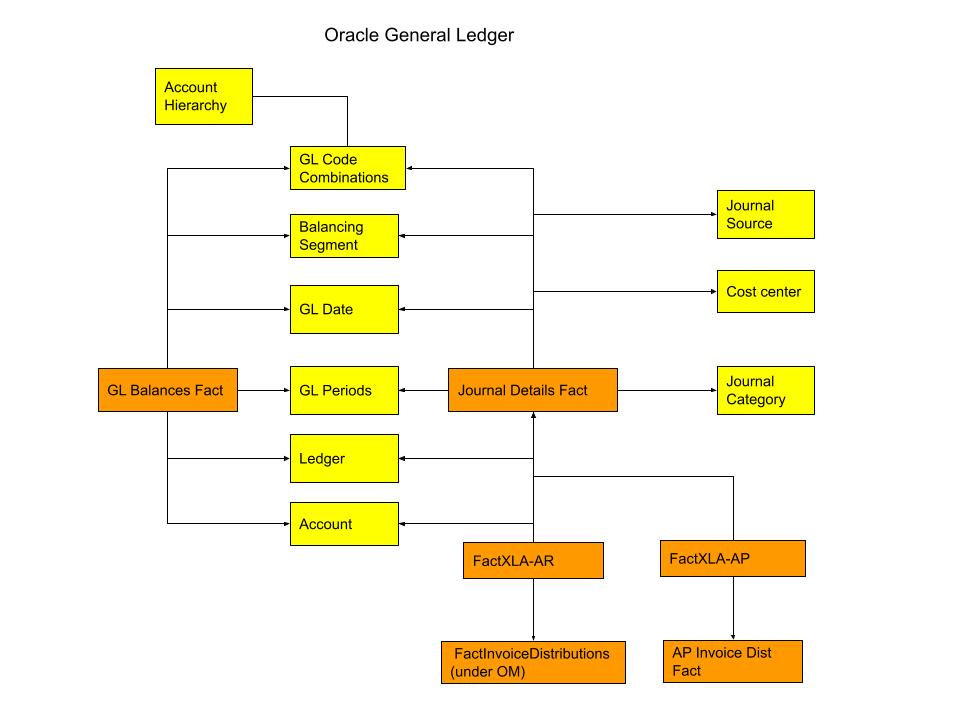
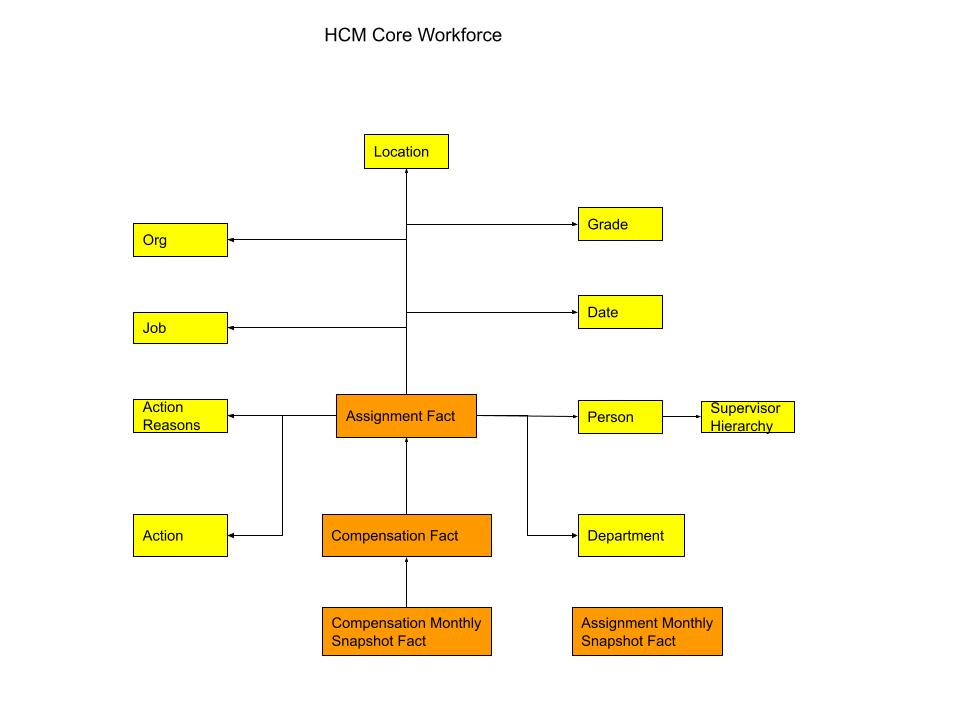
Here are the star schema models for each Oracle Cloud ERP Module.
Procure to Pay
Order to Cash
General Ledger
HCM Core
General Ledger Budgetary Control

Projects (PPM) - Billing and Revenue

Projects (PPM) - Costing and Budgeting
