Incorta logo
Documentation
START FOR FREE
  1. Latest Release Home
  2. Guides
    1. Start
    2. Administer
    3. Analyze
    4. Configure
    5. Deploy
      1. Deploy on AWS
        1. Set Up an AWS Account
        2. Create an AWS tag
        3. Create an IAM Role and Policy
        4. Security Group Open ports
        5. Create an Encryption Key with AWS KMS Servic
        6. Create an EBS Volume
        7. Create an S3 Bucket
        8. Create E2C Instance
        9. Secure Shell in to Incorta
        10. Start Incorta
        11. Connect to Incorta
    6. Install
    7. Migrate
    8. Organize
    9. Secure
    10. Upgrade
    11. Visualize
  3. Concepts
  4. Tools
  5. References
  6. Integrations
  7. Data applications
  8. Release Notes
  9. Incorta Premium
  10. Release Support Policy
  11. Release Model

Create an AWS tag

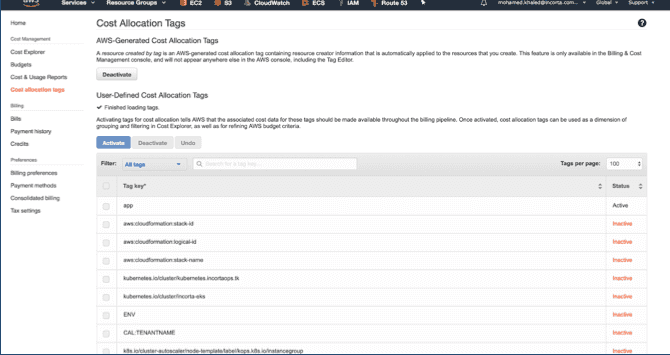
Incorta uses tags for billing and cost allocation. To apply cost allocation tags for Incorta:

  1. Go to the Cost allocation tags url: Cost allocation tags. aws_image18
  2. Select Activate, then filter tags to verify that you have a tag called “app.” Select Activate. aws_image11
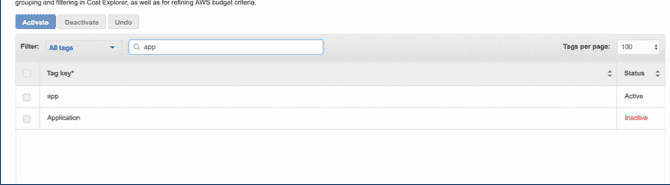
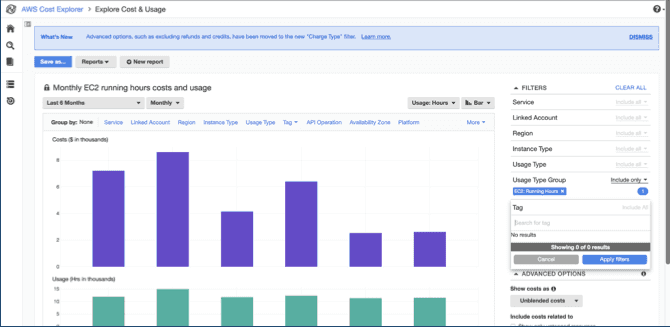
You can now use the “app” tag as a cost filter in Incorta.
aws_image21

© Incorta, Inc. All Rights Reserved.

Privacy Policy